Wednesday, 5 August 2015

All About Statistics In Oracle

All About Statistics In Oracle


In this post I'll try to summarize all sorts of statistics in Oracle, I strongly recommend reading the full article, as it contains information you may find it valuable in understanding Oracle statistics.

#####################################
Database | Schema | Table | Index Statistics
#####################################

Gather Database Statistics:
=======================
SQL> EXEC DBMS_STATS.GATHER_DATABASE_STATS(
     ESTIMATE_PERCENT=>100,METHOD_OPT=>'FOR ALL COLUMNS SIZE SKEWONLY',
    CASCADE => TRUE,
    degree => 4,
    OPTIONS => 'GATHER STALE',
    GATHER_SYS => TRUE,
    STATTAB => PROD_STATS);

CASCADE => TRUE :Gather statistics on the indexes as well. If not used Oracle will decide whether to collect index statistics or not.
DEGREE => 4 :Degree of parallelism.
options: 
       =>'GATHER' :Gathers statistics on all objects in the schema.
       =>'GATHER AUTO' :Oracle determines which objects need new statistics, and determines how to gather those statistics.
       =>'GATHER STALE':Gathers statistics on stale objects. will return a list of stale objects.
       =>'GATHER EMPTY':Gathers statistics on objects have no statistics.will return a list of no stats objects.
        =>'LIST AUTO' : Returns a list of objects to be processed with GATHER AUTO.
        =>'LIST STALE': Returns a list of stale objects as determined by looking at the *_tab_modifications views.
        =>'LIST EMPTY': Returns a list of objects which currently have no statistics.
GATHER_SYS => TRUE :Gathers statistics on the objects owned by the 'SYS' user.
STATTAB => PROD_STATS :Table will save the current statistics. see SAVE & IMPORT STATISTICS section -last third in this post-.

Note: All above parameters are valid for all kind of statistics (schema,table,..) except Gather_SYS.
Note: Skew data means the data inside a column is not uniform, there is a particular one or more value are being repeated much than other values in the same column, for example the gender column in employee table with two values (male/female), in a construction or security service company, where most of employees are male workforce,the gender column in employee table is likely to be skewed but in an entity like a hospital where the number of males almost equal the number of female workforce, the gender column is likely to be not skewed.

For faster execution:

SQL> EXEC DBMS_STATS.GATHER_DATABASE_STATS(
ESTIMATE_PERCENT=>DBMS_STATS.AUTO_SAMPLE_SIZE,degree => 8);

What's new?
ESTIMATE_PERCENT=>DBMS_STATS.AUTO_SAMPLE_SIZE => Let Oracle estimate skewed values always gives excellent results.(DEFAULT).
Removed "METHOD_OPT=>'FOR ALL COLUMNS SIZE SKEWONLY'" => As histograms is not recommended to be gathered on all columns.
Removed  "cascade => TRUE" To let Oracle determine whether index statistics to be collected or not.
Doubled the "degree => 8" but this depends on the number of CPUs on the machine and accepted CPU overhead during gathering DB statistics.

Starting from Oracle 10g, Oracle introduced an automated task gathers statistics on all objects in the database that having [stale or missing] statistics, To check the status of that task:
SQL> select status from dba_autotask_client where client_name = 'auto optimizer stats collection';

To Enable Automatic Optimizer Statistics task:
SQL> BEGIN
    DBMS_AUTO_TASK_ADMIN.ENABLE(
    client_name => 'auto optimizer stats collection', 
    operation => NULL, 
    window_name => NULL);
    END;
    /

In case you want to Disable Automatic Optimizer Statistics task:
SQL> BEGIN
    DBMS_AUTO_TASK_ADMIN.DISABLE(
    client_name => 'auto optimizer stats collection', 
    operation => NULL, 
    window_name => NULL);
    END;
    /

To check the tables having stale statistics:

SQL> exec DBMS_STATS.FLUSH_DATABASE_MONITORING_INFO;
SQL> select OWNER,TABLE_NAME,LAST_ANALYZED,STALE_STATS from DBA_TAB_STATISTICS where STALE_STATS='YES';

[update on 03-Sep-2014]
Note: In order to get an accurate information from DBA_TAB_STATISTICS or (*_TAB_MODIFICATIONS, *_TAB_STATISTICS and *_IND_STATISTICS) views, you should manually run DBMS_STATS.FLUSH_DATABASE_MONITORING_INFO procedure to refresh it's parent table mon_mods_all$ from SGA recent data, or you have wait for an Oracle internal that refresh that table  once a day in 10g onwards [except for 10gR2] or every 15 minutes in 10gR2 or every 3 hours in 9i backwards. or when you run manually run one of GATHER_*_STATS procedures.
[Reference: Oracle Support and MOS ID 1476052.1]

Gather SCHEMA Statistics:
======================
SQL> Exec DBMS_STATS.GATHER_SCHEMA_STATS (
     ownname =>'SCOTT',
     estimate_percent=>10,
     degree=>1,
     cascade=>TRUE,
     options=>'GATHER STALE');


Gather TABLE Statistics:
====================
Check table statistics date:
SQL> select table_name, last_analyzed from user_tables where table_name='T1';

SQL> Begin DBMS_STATS.GATHER_TABLE_STATS (

    ownname => 'SCOTT',
    tabname => 'EMP',
    degree => 2,
    cascade => TRUE,
    METHOD_OPT => 'FOR COLUMNS SIZE AUTO',
    estimate_percent => DBMS_STATS.AUTO_SAMPLE_SIZE);
    END;
    /

CASCADE => TRUE : Gather statistics on the indexes as well. If not used Oracle will determine whether to collect it or not.
DEGREE => 2: Degree of parallelism.
ESTIMATE_PERCENT => DBMS_STATS.AUTO_SAMPLE_SIZE : (DEFAULT) Auto set the sample size % for skew(distinct) values (accurate and faster than setting a manual sample size).
METHOD_OPT=>  :  For gathering Histograms:
 FOR COLUMNS SIZE AUTO :  You can specify one column between "" instead of all columns.
 FOR ALL COLUMNS SIZE REPEAT :  Prevent deletion of histograms and collect it only for columns already have histograms.
 FOR ALL COLUMNS  :  Collect histograms on all columns.
 FOR ALL COLUMNS SIZE SKEWONLY :  Collect histograms for columns have skewed value should test skewness first>.
 FOR ALL INDEXED COLUMNS :  Collect histograms for columns have indexes only.


Note: Truncating a table will not update table statistics, it will only reset the High Water Mark, you've to re-gather statistics on that table.

Inside "DBA BUNDLE", there is a script called "gather_stats.sh", it will help you easily & safely gather statistics on specific schema or table plus providing advanced features such as backing up/ restore new statistics in case of fallback.
To learn more about "DBA BUNDLE" please visit this post:
http://dba-tips.blogspot.com/2014/02/oracle-database-administration-scripts.html


Gather Index Statistics:
===================
SQL> exec DBMS_STATS.GATHER_INDEX_STATS(ownname => 'SCOTT',indname => 'EMP_I',
     estimate_percent =>DBMS_STATS.AUTO_SAMPLE_SIZE);

####################
Fixed OBJECTS Statistics
####################

What are Fixed objects:
----------------------------
-Fixed objects are the x$ tables (been loaded in SGA during startup) on which V$ views are built (V$SQL etc.).
-If the statistics are not gathered on fixed objects, the Optimizer will use predefined default values for the statistics. These defaults may lead to inaccurate execution plans.
-Statistics on fixed objects are not being gathered automatically nor within gathering DB stats.

How frequent to gather stats on fixed objects?
-------------------------------------------------------
Only one time for a representative workload unless you've one of these cases:

- After a major database or application upgrade.
- After implementing a new module.
- After changing the database configuration. e.g. changing the size of memory pools (sga,pga,..).
- Poor performance/Hang encountered while querying dynamic views e.g. V$ views.


Note:
- It's recommended to Gather the fixed object stats during peak hours (system is busy) or after the peak hours but the sessions are still connected (even if they idle), to guarantee that the fixed object tables been populated and the statistics well represent the DB activity.
- Also note that performance degradation may be experienced while the statistics are gathering.
- Having no statistics is better than having a non representative statistics.

How to gather stats on fixed objects:
---------------------------------------------

First Check the last analyzed date:
------ -----------------------------------
SQL> select OWNER, TABLE_NAME, LAST_ANALYZED
       from dba_tab_statistics where table_name='X$KGLDP';
Second Export the current fixed stats in a table: (in case you need to revert back)
------- -----------------------------------
SQL> EXEC DBMS_STATS.CREATE_STAT_TABLE
       ('OWNER','STATS_TABLE_NAME','TABLESPACE_NAME');

SQL> EXEC dbms_stats.export_fixed_objects_stats
       (stattab=>'STATS_TABLE_NAME',statown=>'OWNER');
Third Gather the fixed objects stats:
-------  ------------------------------------
SQL> exec dbms_stats.gather_fixed_objects_stats;

Note:
In case you experienced a bad performance on fixed tables after gathering the new statistics:

SQL> exec dbms_stats.delete_fixed_objects_stats(); 
SQL> exec DBMS_STATS.import_fixed_objects_stats
       (stattab =>'STATS_TABLE_NAME',STATOWN =>'OWNER');


#################
SYSTEM STATISTICS
#################

What is system statistics:
-------------------------------
System statistics are statistics about CPU speed and IO performance, it enables the CBO to
effectively cost each operation in an execution plan. Introduced in Oracle 9i.

Why gathering system statistics:
----------------------------------------
Oracle highly recommends gathering system statistics during a representative workload,
ideally at peak workload time, in order to provide more accurate CPU/IO cost estimates to the optimizer.
You only have to gather system statistics once.

There are two types of system statistics (NOWORKLOAD statistics & WORKLOAD statistics):

NOWORKLOAD statistics:
-----------------------------------
This will simulates a workload -not the real one but a simulation- and will not collect full statistics, it's less accurate than "WORKLOAD statistics" but if you can't capture the statistics during a typical workload you can use noworkload statistics.
To gather noworkload statistics:
SQL> execute dbms_stats.gather_system_stats();

WORKLOAD statistics:
-------------------------------
This will gather statistics during the current workload [which supposed to be representative of actual system I/O and CPU workload on the DB].
To gather WORKLOAD statistics:
SQL> execute dbms_stats.gather_system_stats('start');
Once the workload window ends after 1,2,3.. hours or whatever, stop the system statistics gathering:
SQL> execute dbms_stats.gather_system_stats('stop');
You can use time interval (minutes) instead of issuing start/stop command manually:
SQL> execute dbms_stats.gather_system_stats('interval',60);

Check the system values collected:
-------------------------------------------
col pname format a20
col pval2 format a40
select * from sys.aux_stats$;


cpuspeedNW:  Shows the noworkload CPU speed, (average number of CPU cycles per second).
ioseektim:    The sum of seek time, latency time, and OS overhead time.
iotfrspeed:  I/O transfer speed,tells optimizer how fast the DB can read data in a single read request.
cpuspeed:      Stands for CPU speed during a workload statistics collection.
maxthr:          The maximum I/O throughput.
slavethr:      Average parallel slave I/O throughput.
sreadtim:     The Single Block Read Time statistic shows the average time for a random single block read.
mreadtim:     The average time (seconds) for a sequential multiblock read.
mbrc:             The average multiblock read count in blocks.

Notes:
-When gathering NOWORKLOAD statistics it will gather (cpuspeedNW, ioseektim, iotfrspeed) system statistics only.
-Above values can be modified manually using DBMS_STATS.SET_SYSTEM_STATS procedure.
-According to Oracle, collecting workload statistics doesn't impose an additional overhead on your system.

Delete system statistics:
------------------------------
SQL> execute dbms_stats.delete_system_stats();


####################
Data Dictionary Statistics
####################

Facts:
-------
> Dictionary tables are the tables owned by SYS and residing in the system tablespace.
> Normally data dictionary statistics in 9i is not required unless performance issues are detected.
> In 10g Statistics on the dictionary tables will be maintained via the automatic statistics gathering job run during the nightly maintenance window.

If you choose to switch off that job for application schema consider leaving it on for the dictionary tables. You can do this by changing the value of AUTOSTATS_TARGET from AUTO to ORACLE using the procedure:

SQL> Exec DBMS_STATS.SET_PARAM(AUTOSTATS_TARGET,'ORACLE'); 

When to gather Dictionary statistics:
---------------------------------------------
-After DB upgrades.
-After creation of a new big schema.
-Before and after big datapump operations.

Check last Dictionary statistics date:
---------------------------------------------
SQL> select table_name, last_analyzed from dba_tables
     where owner='SYS' and table_name like '%$' order by 2;

Gather Dictionary Statistics:
-----------------------------------
SQL> EXEC DBMS_STATS.GATHER_DICTIONARY_STATS;
->Will gather stats on 20% of SYS schema tables.
or...
SQL> EXEC DBMS_STATS.GATHER_SCHEMA_STATS ('SYS');
->Will gather stats on 100% of SYS schema tables.
or...
SQL> EXEC DBMS_STATS.GATHER_DATABASE_STATS(gather_sys=>TRUE);
->Will gather stats on the whole DB+SYS schema.


################
Extended Statistics "11g onwards"
################

Extended statistics can be gathered on columns based on functions or column groups.

Gather extended stats on column function:
====================================
If you run a query having in the WHERE statement a function like upper/lower the optimizer will be off and index on that column will not be used:
SQL> select count(*) from EMP where lower(ename) = 'scott';

In order to make optimizer work with function based terms you need to gather extended stats:

1-Create extended stats:
>>>>>>>>>>>>>>>>>>>>
SQL> select dbms_stats.create_extended_stats
('SCOTT','EMP','(lower(ENAME))') from dual;

2-Gather histograms:
>>>>>>>>>>>>>>>>>
SQL> exec dbms_stats.gather_table_stats('SCOTT','EMP', method_opt=> 'for all columns size skewonly');

OR
----
*You can do it also in one Step:
>>>>>>>>>>>>>>>>>>>>>>>>>

SQL> Begin dbms_stats.gather_table_stats
     (ownname => 'SCOTT',tabname => 'EMP',
     method_opt => 'for all columns size skewonly for
     columns (lower(ENAME))');
     end;
     /

To check the Existence of extended statistics on a table:
----------------------------------------------------------------------
SQL> select extension_name,extension from dba_stat_extensions where owner='SCOTT'and table_name = 'EMP';
SYS_STU2JLSDWQAFJHQST7$QK81_YB (LOWER("ENAME"))

Drop extended stats on column function:
------------------------------------------------------
SQL> exec dbms_stats.drop_extended_stats('SCOTT','EMP','(LOWER("ENAME"))');

Gather extended stats on column group: -related columns-
=================================
Certain columns in a table that are part of a join condition (where statement  are correlated e.g.(country,state). You want to make the optimizer aware of this relationship between two columns and more instead of using separate statistics for each columns. By creating extended statistics on a group of columns, the Optimizer can determine a more accurate the relation between the columns are used together in a where clause of a SQL statement. e.g. columns like country_id and state_name the have a relationship, state like Texas can only be found in USA so the value of state_name are always influenced by country_id.
If there are extra columns are referenced in the "WHERE statement  with the column group the optimizer will make use of column group statistics.

1- create a column group:
>>>>>>>>>>>>>>>>>>>>>
SQL> select dbms_stats.create_extended_stats('SH','CUSTOMERS', '(country_id,cust_state_province)')from dual;
2- Re-gather stats|histograms for table so optimizer can use the newly generated extended statistics:
>>>>>>>>>>>>>>>>>>>>>>>
SQL> exec dbms_stats.gather_table_stats ('SH','customers',method_opt=> 'for all columns size skewonly');

OR
---

*You can do it also in one Step:
>>>>>>>>>>>>>>>>>>>>>>>>>

SQL> Begin dbms_stats.gather_table_stats
     (ownname => 'SH',tabname => 'CUSTOMERS',
     method_opt => 'for all columns size skewonly for
     columns (country_id,cust_state_province)');
     end;
     /

Drop extended stats on column group:
--------------------------------------------------
SQL> exec dbms_stats.drop_extended_stats('SH','CUSTOMERS', '(country_id,cust_state_province)');


#########
Histograms
#########

What are Histograms?
-----------------------------
> Holds data about values within a column in a table for number of occurrences for a specific value/range.
> Used by CBO to optimize a query to use whatever index Fast Full scan or table full scan.
> Usually being used against columns have data being repeated frequently like country or city column.
> gathering histograms on a column having distinct values (PK) is useless because values are not repeated.
> Two types of Histograms can be gathered:
  -Frequency histograms: is when distinct values (buckets) in the column is less than 255 (e.g. the number of countries is always less than 254).
  -Height balanced histograms: are similar to frequency histograms in their design, but distinct values  > 254
    See an Example: http://aseriesoftubes.com/articles/beauty-and-it/quick-guide-to-oracle-histograms
> Collected by DBMS_STATS (which by default doesn't collect histograms, it deletes them if you didn't use the parameter).
> Mainly being gathered on foreign key columns/columns in WHERE statement.
> Help in SQL multi-table joins.
> Column histograms like statistics are being stored in data dictionary.
> If application exclusively uses bind variables, Oracle recommends deleting any existing histograms and disabling Oracle histograms generation.

Cautions:
   – Do not create them on Columns that are not being queried.
   – Do not create them on every column of every table.
   – Do not create them on the primary key column of a table.

Verify the existence of histograms:
---------------------------------------------
SQL> select column_name,histogram from dba_tab_col_statistics
     where owner='SCOTT' and table_name='EMP';

Creating Histograms:
---------------------------
e.g.
SQL> Exec dbms_stats.gather_schema_stats
     (ownname => 'SCOTT',
     estimate_percent => dbms_stats.auto_sample_size,
     method_opt => 'for all columns size auto',
     degree => 7);


method_opt:
FOR COLUMNS SIZE AUTO                 => Fastest. you can specify one column instead of all columns.
FOR ALL COLUMNS SIZE REPEAT     => Prevent deletion of histograms and collect it only for columns already have histograms.
FOR ALL COLUMNS => collect histograms on all columns .
FOR ALL COLUMNS SIZE SKEWONLY => collect histograms for columns have skewed value .
FOR ALL INDEXES COLUMNS      => collect histograms for columns have indexes.

Note: AUTO & SKEWONLY will let Oracle decide whether to create the Histograms or not.

Check the existence of Histograms:
SQL> select column_name, count(*) from dba_tab_histograms
     where OWNER='SCOTT' table_name='EMP' group by column_name;

Drop Histograms: 11g
----------------------
e.g.
SQL> Exec dbms_stats.delete_column_stats
     (ownname=>'SH', tabname=>'SALES',
     colname=>'PROD_ID', col_stat_type=> HISTOGRAM);


Stop gather Histograms: 11g
------------------------------
[This will change the default table options]
e.g.
SQL> Exec dbms_stats.set_table_prefs
     ('SH', 'SALES','METHOD_OPT', 'FOR ALL COLUMNS SIZE AUTO,FOR COLUMNS SIZE 1 PROD_ID');
>Will continue to collect histograms as usual on all columns in the SALES table except for PROD_ID column.

Drop Histograms: 10g
----------------------
e.g.
SQL> exec dbms_stats.delete_column_stats(user,'T','USERNAME');


################################
Save/IMPORT & RESTORE STATISTICS:
################################
====================
Export /Import Statistics:
====================
In this way statistics will be exported into table then imported later from that table.

1-Create STATS TABLE:
-  -----------------------------
SQL> Exec dbms_stats.create_stat_table(ownname => 'SYSTEM', stattab => 'prod_stats',tblspace => 'USERS'); 

2-Export statistics to the STATS table:
---------------------------------------------------
For Database stats:
SQL> Exec dbms_stats.export_database_stats(statown => 'SYSTEM', stattab => 'prod_stats');
For System stats:
SQL> Exec dbms_stats.export_SYSTEM_stats(statown => 'SYSTEM', stattab => 'prod_stats');
For Dictionary stats:
SQL> Exec dbms_stats.export_Dictionary_stats(statown => 'SYSTEM', stattab => 'prod_stats');
For Fixed Tables stats:
SQL> Exec dbms_stats.export_FIXED_OBJECTS_stats(statown => 'SYSTEM', stattab => 'prod_stats');
For Schema stas:
SQL> EXEC DBMS_STATS.EXPORT_SCHEMA_STATS('ORIGINAL_SCHEMA','STATS_TABLE',NULL,'STATS_TABLE_OWNER');
For Table:
SQL> Conn scott/tiger
SQL> Exec dbms_stats.export_TABLE_stats
(ownname => 'SCOTT',tabname => 'EMP',stattab => 'prod_stats');
For Index:
SQL> Exec dbms_stats.export_INDEX_stats(ownname => 'SCOTT',indname => 'PK_EMP',stattab => 'prod_stats');
For Column:
SQL> Exec dbms_stats.export_COLUMN_stats (ownname=>'SCOTT',tabname=>'EMP',colname=>'EMPNO',stattab=>'prod_stats');

3-Import statistics from PROD_STATS table to the dictionary:
---------------------------------------------------------------------------------
For Database stats:
SQL> Exec DBMS_STATS.IMPORT_DATABASE_STATS
     (stattab => 'prod_stats',statown => 'SYSTEM');
For System stats:
SQL> Exec DBMS_STATS.IMPORT_SYSTEM_STATS
     (stattab => 'prod_stats',statown => 'SYSTEM');
For Dictionary stats:
SQL> Exec DBMS_STATS.IMPORT_Dictionary_STATS
     (stattab => 'prod_stats',statown => 'SYSTEM');
For Fixed Tables stats:
SQL> Exec DBMS_STATS.IMPORT_FIXED_OBJECTS_STATS
     (stattab => 'prod_stats',statown => 'SYSTEM');
For Schema stats:
SQL> Exec DBMS_STATS.IMPORT_SCHEMA_STATS
     (ownname => 'SCOTT',stattab => 'prod_stats', statown => 'SYSTEM');
For Table stats and it's indexes:
SQL> Exec dbms_stats.import_TABLE_stats
     ( ownname => 'SCOTT', stattab => 'prod_stats',tabname => 'EMP');
For Index:
SQL> Exec dbms_stats.import_INDEX_stats
     ( ownname => 'SCOTT', stattab => 'prod_stats', indname => 'PK_EMP');
For COLUMN:
SQL> Exec dbms_stats.import_COLUMN_stats
     (ownname=>'SCOTT',tabname=>'EMP',colname=>'EMPNO',stattab=>'prod_stats');

4-Drop STAT Table:
--------------------------
SQL> Exec dbms_stats.DROP_STAT_TABLE (stattab => 'prod_stats',ownname => 'SYSTEM');

===============
Restore statistics: -From Dictionary-
===============
Old statistics are saved automatically in SYSAUX for 31 day.

Restore Dictionary stats as of timestamp:
------------------------------------------------------
SQL> Exec DBMS_STATS.RESTORE_DICTIONARY_STATS(sysdate-1);

Restore Database stats as of timestamp:
----------------------------------------------------
SQL> Exec DBMS_STATS.RESTORE_DATABASE_STATS(sysdate-1);

Restore SYSTEM stats as of timestamp:
----------------------------------------------------
SQL> Exec DBMS_STATS.RESTORE_SYSTEM_STATS(sysdate-1);

Restore FIXED OBJECTS stats as of timestamp:
----------------------------------------------------------------
SQL> Exec DBMS_STATS.RESTORE_FIXED_OBJECTS_STATS(sysdate-1);

Restore SCHEMA stats as of timestamp:
---------------------------------------
SQL> Exec dbms_stats.restore_SCHEMA_stats
     (ownname=>'SYSADM',AS_OF_TIMESTAMP=>sysdate-1);
OR:
SQL> Exec dbms_stats.restore_schema_stats
     (ownname=>'SYSADM',AS_OF_TIMESTAMP=>'20-JUL-2008 11:15:00AM');

Restore Table stats as of timestamp:
------------------------------------------------
SQL> Exec DBMS_STATS.RESTORE_TABLE_STATS
     (ownname=>'SYSADM', tabname=>'T01POHEAD',AS_OF_TIMESTAMP=>sysdate-1);

=========
Advanced:
=========

To Check current Stats history retention period (days):
-------------------------------------------------------------------
SQL> select dbms_stats.get_stats_history_retention from dual;
SQL> select dbms_stats.get_stats_history_availability 
from dual;
To modify current Stats history retention period (days):
-------------------------------------------------------------------
SQL> Exec dbms_stats.alter_stats_history_retention(60);

Purge statistics older than 10 days:
------------------------------------------
SQL> Exec DBMS_STATS.PURGE_STATS(SYSDATE-10);

Procedure To claim space after purging statstics:
>>>>>>>>>>>>>>>>>>>>>>>>>>>>>>>>>>>>>>>
Space will not be claimed automatically when you purge stats, you must claim it manually using this procedure:

Check Stats tables size:
>>>>>>
        col Mb form 9,999,999
        col SEGMENT_NAME form a40
        col SEGMENT_TYPE form a6
        set lines 120
        select sum(bytes/1024/1024) Mb,
        segment_name,segment_type from dba_segments
         where  tablespace_name = 'SYSAUX'
        and segment_name like 'WRI$_OPTSTAT%'
        and segment_type='TABLE'
        group by segment_name,segment_type order by 1 asc
        /

Check Stats indexes size:
>>>>>
        col Mb form 9,999,999
        col SEGMENT_NAME form a40
        col SEGMENT_TYPE form a6
        set lines 120
        select sum(bytes/1024/1024) Mb, segment_name,segment_type
        from dba_segments
        where  tablespace_name = 'SYSAUX'
        and segment_name like '%OPT%'
        and segment_type='INDEX'
        group by segment_name,segment_type order by 1 asc
        /
Move Stats tables in same tablespace:
>>>>>
        select 'alter table '||segment_name||'  move tablespace
        SYSAUX;' from dba_segments
        where tablespace_name = 'SYSAUX'
        and segment_name like '%OPT%' and segment_type='TABLE'
        /
Rebuild stats indexes:
>>>>>>
        select 'alter index '||segment_name||'  rebuild online;'
        from dba_segments where tablespace_name = 'SYSAUX'
        and segment_name like '%OPT%' and segment_type='INDEX'
        /

Check for un-usable indexes:
>>>>>
        select  di.index_name,di.index_type,di.status  from
        dba_indexes di , dba_tables dt
        where  di.tablespace_name = 'SYSAUX'
        and dt.table_name = di.table_name
        and di.table_name like '%OPT%'
        order by 1 asc
        /

Delete Statistics:
==============
For Database stats:
SQL> Exec DBMS_STATS.DELETE_DATABASE_STATS ();
For System stats:
SQL> Exec DBMS_STATS.DELETE_SYSTEM_STATS ();
For Dictionary stats:
SQL> Exec DBMS_STATS.DELETE_DICTIONARY_STATS ();
For Fixed Tables stats:
SQL> Exec DBMS_STATS.DELETE_FIXED_OBJECTS_STATS ();
For Schema stats:
SQL> Exec DBMS_STATS.DELETE_SCHEMA_STATS ('SCOTT');
For Table stats and it's indexes:
SQL> Exec dbms_stats.DELETE_TABLE_stats(ownname=>'SCOTT',tabname=>'EMP');
For Index:
SQL> Exec dbms_stats.DELETE_INDEX_stats(ownname => 'SCOTT',indname => 'PK_EMP');
For Column:
SQL> Exec dbms_stats.DELETE_COLUMN_stats(ownname =>'SCOTT',tabname=>'EMP',colname=>'EMPNO');

Note: This procedure can be rollback by restoring STATS using DBMS_STATS.RESTORE_ procedure.


Pending Statistics:  "11g onwards"
===============
What is Pending Statistics:
Pending statistics is a feature let you test the new gathered statistics without letting the CBO (Cost Based Optimizer) use them "system wide" unless you publish them.

How to use Pending Statistics:
Switch on pending statistics mode:
SQL> Exec DBMS_STATS.SET_GLOBAL_PREFS('PUBLISH','FALSE');
Note: Any new statistics will be gathered on the database will be marked PENDING unless you change back the previous parameter to true:
SQL> Exec DBMS_STATS.SET_GLOBAL_PREFS('PUBLISH','TRUE');

Gather statistics: "as you used to do"
SQL> Exec DBMS_STATS.GATHER_TABLE_STATS('sh','SALES');
Enable using pending statistics on your session only:
SQL> Alter session set optimizer_use_pending_statistics=TRUE;
Then any SQL statement you will run will use the new pending statistics...

When proven OK, publish the pending statistics:
SQL> Exec DBMS_STATS.PUBLISH_PENDING_STATS();

Once you finish don't forget to return the Global PUBLISH parameter to TRUE:
SQL> Exec DBMS_STATS.SET_GLOBAL_PREFS('PUBLISH','TRUE');
>If you didn't do so, all new gathered statistics on the database will be marked as PENDING, the thing may confuse you or any DBA working on this DB in case he is not aware of that parameter change.

References:
http://docs.oracle.com/cd/E18283_01/appdev.112/e16760/d_stats.htm

FAST-START FAILOVER (FSF)

FAST-START FAILOVER (FSF)


The following conditions must be met before you can use the broker:

Primary and standby DB’s must be on same version
You must use a SPFILE to ensure the broker can persistently reconcile values between broker properties.
DG_BROKER_START parameter must be set to TRUE.
DG_BROKER_CONFIG_FILE file should be place in the shared area for RAC.
Oracle Net Services network files must be set up on the primary database and on the standby database.
To enable DGMGRL to restart instances during the course of broker operations, a service with a specific name must be statically registered with the local listener of each instance.
the primary database must be opened in ARCHIVELOG mode.
Ensure the COMPATIBLE initialization parameter is set to the same value on all systems.
■ Flashback database should be enable for fast start failover.


Enabling Fast-Start Failover

If you have more than one standby database, then we have to select the one which will be used by the FAST START FAILOVER operation


FAST START FAILOVER CONFIGURATION

DGMGRL> show fast_start failover

Fast-Start Failover: DISABLED

  Threshold:        180 seconds
  Target:           (none)
  Observer:         (none)
  Lag Limit:        30 seconds
  Shutdown Primary: TRUE
  Auto-reinstate:   TRUE

Configurable Failover Conditions
  Health Conditions:
    Corrupted Controlfile          YES
    Corrupted Dictionary           YES
    Inaccessible Logfile            NO
    Stuck Archiver                  NO
    Datafile Offline               YES

  Oracle Error Conditions:
    (none)

ASSIGNING FAILOVER TARGET

DGMGRL> EDIT DATABASE 'BHUVAN_A' SET PROPERTY FastStartFailoverTarget = 'BHUVAN_B';
Property "faststartfailovertarget" updated

DGMGRL> EDIT DATABASE 'BHUVAN_B' SET PROPERTY FastStartFailoverTarget = 'BHUVAN_A';
Property "faststartfailovertarget" updated

DGMGRL> show fast_start failover

Note: When you have only one target on the standby database, then there is no need to specify the target.

SETTING PROTECTION MODE


DGMGRL> SHOW DATABASE 'BHUVAN_A' 'LogXptStatus';
LOG TRANSPORT STATUS
PRIMARY_INSTANCE_NAME STANDBY_DATABASE_NAME               STATUS
               FE1_1                BHUVAN_B
               FE1_2                BHUVAN_B

To Display the protection mode

DGMGRL> show configuration

Configuration - DG_BHUVAN

  Protection Mode: MaxAvailability
  Databases:
    BHUVAN_A - Primary database
    BHUVAN_B - Physical standby database

Fast-Start Failover: DISABLED

Configuration Status:
SUCCESS

Enable maximum availability mode or maximum performance mode.

DGMGRL> EDIT CONFIGURATION SET PROTECTION MODE AS MaxAvailability;

Note: 1) If you cannot tolerate any loss of data, then ensure that the configuration protection mode is set to maximum availability. To do this, the LogXptMode database property for both the primary and target standby database must be set to SYNC.
DGMGRL> EDIT DATABASE ’BHUVAN_A’ SET PROPERTY LogXptMode=SYNC;
DGMGRL> EDIT DATABASE ’BHUVAN_B’ SET PROPERTY LogXptMode=SYNC;

     2) If you can tolerate data loss, then we can go for maximum performance mode and set FastStartFailoverLagLimit. This property specifies the amount of data, in seconds, that the target standby database can lag behind the primary database in terms of redo applied.

DGMGRL> EDIT DATABASE ’BHUVAN_A’ SET PROPERTY LogXptMode=ASYNC;
DGMGRL> EDIT DATABASE ’BHUVAN_B’ SET PROPERTY LogXptMode=ASYNC;
DGMGRL> EDIT CONFIGURATION SET PROTECTION MODE AS MaxPerformance;
DGMGRL> EDIT CONFIGURATION SET PROPERTY FastStartFailoverLagLimit=45;


FAST START FAILOVER CONFIGURATION PROPERTY.

Fast-start failover will occur if both the observer and the target standby database lose connection to the primary database for the period of time specified by the FastStartFailoverThreshold configuration property.

DGMGRL> EDIT CONFIGURATION SET PROPERTY FastStartFailoverThreshold = '60';
Property "faststartfailoverthreshold" updated

Note: 1) Setting the Threshold value for RAC System[ID 1319917.1]
Check the css value from the cluster environment

$ crsctl get css misscount
CRS-4678: Successful get misscount 30 for Cluster Synchronization Services.

Add 30 to 30 sec extra. I have 30 sec for my miss count. So I am setting this value as 60

2) Setting FastStartFailoverPmyShutdown
If the FastStartFailoverPmyShutdown configuration property is set to TRUE, the primary database will shut down after FastStartFailoverThreshold seconds has elapsed if redo generation has been stalled and the primary database is unable to re-establish connectivity with either the observer or target standby database.

DGMGRL> EDIT CONFIGURATION SET PROPERTY FastStartFailoverPmyShutdown = 'TRUE';
Property "faststartfailoverpmyshutdown" updated

DGMGRL> show fast_start failover;

Fast-Start Failover: DISABLED

  Threshold:        60 seconds
  Target:           (none)
  Observer:         (none)
  Lag Limit:        30 seconds
  Shutdown Primary: TRUE
  Auto-reinstate:   TRUE

Configurable Failover Conditions
  Health Conditions:
    Corrupted Controlfile          YES
    Corrupted Dictionary           YES
    Inaccessible Logfile            NO

    Stuck Archiver                  NO
    Datafile Offline               YES

  Oracle Error Conditions:
    (none)

3) Setting FastStartFailoverAutoReinstate
This configuration property causes the former primary database to be automatically reinstated if a fast-start failover was initiated because the primary database was either isolated or had crashed.

DGMGRL> EDIT CONFIGURATION SET PROPERTY FastStartFailoverAutoReinstate = 'TRUE';
Property "faststartfailoverautoreinstate" updated

4) ObserverConnectIdentifier, This database property is used to specify how the observer should connect to and monitor the primary and standby database. Set this property for the
Primary and target standby database if you want the observer to use a different connect identifier than that used to ship redo data (that is, the connect identifier specified by the DGConnectIdentifierproperty).

DGMGRL> EDIT DATABASE ‘DB_NAME’ SET PROPERTY ObserverConnectIdentifier = ' ';


5) Enable additional fast-start failover conditions

Fast-start failover is done when both the observer and the standby cannot reach the primary after the configured time threshold (FastStartFailoverThreshold) has passed.
You can optionally indicate the database health conditions that should cause fast-start failover to occur.

Below parameters are enable by default.
1) A datafile is offline because of a write error
2) Dictionary corruption of a critical database object
3) Control file damaged because of a disk error
4) LGWR is unable to write to any member of the log group because of an I/O error
5) Archive is unable to archive a redo log because the device is full or unavailable
6) Primary to observer and primary to standby network failure
7) An instance crash occurs (single instance)
8) All instances of a rac crash
9) Shutdown abort of primary
10) You can specify a error message, if you want to start the Fast start failover process. When I get ORA-xxxxx error is detected on the primary database with the following command:

DGMGRL> ENABLE FAST_START FAILOVER CONDITION xxxxx;


DGMGRL> enable fast_start failover condition "Inaccessible Logfile";
Succeeded.

DGMGRL> enable fast_start failover condition "Stuck Archiver";
Succeeded.

ENABLE FAST-START FAILOVER

DGMGRL> enable fast_start failover;
Enabled.

DGMGRL> show fast_start failover;

Fast-Start Failover: ENABLED

  Threshold:        60 seconds
  Target:           BHUVAN_B
  Observer:         (none)
  Lag Limit:        30 seconds (not in use)
  Shutdown Primary: TRUE
  Auto-reinstate:   TRUE

Configurable Failover Conditions
  Health Conditions:
    Corrupted Controlfile          YES
    Corrupted Dictionary           YES
    Inaccessible Logfile            NO
    Stuck Archiver                  NO
    Datafile Offline               YES

  Oracle Error Conditions:
    (none)

Start the Observer

Must install DGMGRL on an observer computer (Not on the same DB server)
1) Install complete Oracle Client Administrator
2) Install a full db installation

1. PRE-REQS Must be in max availability or max performance
2. LogXptMode
LogXptMode must be in SYNC in max availability for 11g
LogXptMode must be in ASYNC in max performance for 11g
3. FLASHBACK DB must be enabled on primary and standby
4. tnsnames.ora must be configured on the observer
5. A static service name must exist so the observer can automatically restart databases.

You can start the observer before or after you enable fast-start failover. If fast-start failover is already enabled, the observer immediately begins monitoring the status and connections to the primary and target standby databases. If fast-start failover is not already enabled, the observer waits until fast-start failover gets enabled and then begins monitoring.

#!/bin/ksh
# startobserver
dgmgrl -logfile 11g_observer.log << eof
connect sys/oracle@bhuvan
START OBSERVER;
Eof

You can check the process in the unix side, whether the process is running
Ps –ef|grep filename

Tips
1) Error “ORA-16820”
Error message: Fast-Start Failover observer is no longer observing this db
Solution è Check the reason why the observer cannot contact this database. If the problem cannot be corrected, stop the current observer by connecting to the Data Guard configuration and issue the DGMGRL "STOP OBSERVER" command. Then restart the observer

2) To get more information about the configuration
DGMGRL> show configuration verbose;
DGMGRL> show database verbose ‘DB_NAME’;

3) OBSERVER CONFIGURATION
DGMGRL> START OBSERVER FILE=/oracle/observer/obs.dat;
If file is not set the current working directory is searched for a file name FSFO.dat.

4) To view FAST START FAIL OVER INFORMATION (PRIMARY & STANDBY)

SQL> SELECT FS_FAILOVER_STATUS,FS_FAILOVER_CURRENT_TARGET, db_unique_name, FS_FAILOVER_THRESHOLD, FS_FAILOVER_OBSERVER_PRESENT,FS_FAILOVER_OBSERVER_HOST
FROM V$DATABASE;

5) To view the reason for the FAST START FAILOVER

SELECT LAST_FAILOVER_TIME, LAST_FAILOVER_REASON FROM
V$FS_FAILOVER_STATUS;

Friday, 22 May 2015

Oracle RAC

RAC Architecture
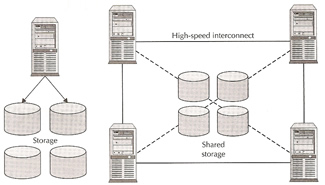
Oracle Real Application clusters allows multiple instances to access a single database, the instances will be running on multiple nodes. In an standard Oracle configuration a database can only be mounted by one instance but in a RAC environment many instances can access a single database.

Oracle's RAC is heavy dependent on a efficient, high reliable high speed private network called the interconnect, make sure when designing a RAC system that you get the best that you can afford.
The table below describes the difference of a standard oracle database (single instance) an a RAC environment
Component Single Instance Environment RAC Environment
SGA Instance has its own SGA Each instance has its own SGA
Background processes Instance has its own set of background processes Each instance has its own set of background processes
Datafiles Accessed by only one instance Shared by all instances (shared storage)
Control Files Accessed by only one instance Shared by all instances (shared storage)
Online Redo Logfile Dedicated for write/read to only one instance Only one instance can write but other instances can read during recovery and archiving. If an instance is shutdown, log switches by other instances can force the idle instance redo logs to be archived
Archived Redo Logfile Dedicated to the instance Private to the instance but other instances will need access to all required archive logs during media recovery
Flash Recovery Log Accessed by only one instance Shared by all instances (shared storage)
Alert Log and Trace Files Dedicated to the instance Private to each instance, other instances never read or write to those files.
ORACLE_HOME Multiple instances on the same server accessing different databases ca use the same executable files Same as single instance plus can be placed on shared file system allowing a common ORACLE_HOME for all instances in a RAC environment.
RAC Components
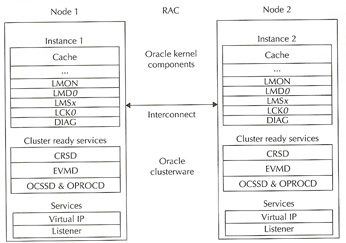
The major components of a Oracle RAC system are
  • Shared disk system
  • Oracle Clusterware
  • Cluster Interconnects
  • Oracle Kernel Components
The below diagram describes the basic architecture of the Oracle RAC environment

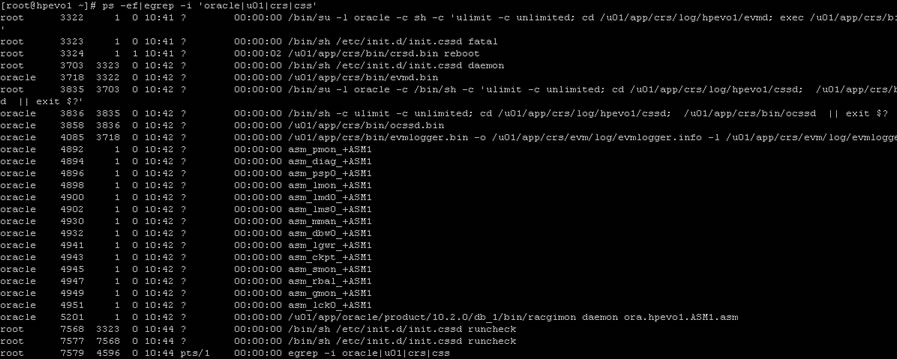
Here are a list of processes running on a freshly installed RAC


Disk architecture
With today's SAN and NAS disk storage systems, sharing storage is fairly easy and is required for a RAC environment, you can use the below storage setups
  • SAN (Storage Area Networks) - generally using fibre to connect to the SAN
  • NAS ( Network Attached Storage) - generally using a network to connect to the NAS using either NFS, ISCSI
  • JBOD - direct attached storage, the old traditional way and still used by many companies as a cheap option
All of the above solutions can offer multi-pathing to reduce SPOFs within the RAC environment, there is no reason not to configure multi-pathing as the cost is cheap when adding additional paths to the disk because most of the expense is paid when out when configuring the first path, so an additional controller card and network/fibre cables is all that is need.
The last thing to think about is how to setup the underlining disk structure this is known as a raid level, there are about 12 different raid levels that I know off, here are the most common ones
raid 0 (Striping) A number of disks are concatenated together to give the appearance of one very large disk.
Advantages
   Improved performance
   Can Create very large Volumes
Disadvantages
   Not highly available (if one disk fails, the volume fails)
raid 1 (Mirroring) A single disk is mirrored by another disk, if one disk fails the system is unaffected as it can use its mirror.
Advantages
   Improved performance
   Highly Available (if one disk fails the mirror takes over)

Disadvantages
   Expensive (requires double the number of disks)
raid 5 Raid stands for Redundant Array of Inexpensive Disks, the disks are striped with parity across 3 or more disks, the parity is used in the event that one of the disks fails, the data on the failed disk is reconstructed by using the parity bit.
Advantages
   Improved performance (read only)
   Not expensive

Disadvantages
   Slow write operations (caused by having to create the parity bit)
There are many other raid levels that can be used with a particular hardware environment for example EMC storage uses the RAID-S, HP storage uses Auto RAID, so check with the manufacture for the best solution that will provide you with the best performance and resilience.
Once you have you storage attached to the servers, you have three choices on how to setup the disks
  • Raw Volumes - normally used for performance benefits, however they are hard to manage and backup
  • Cluster FileSystem - used to hold all the Oracle datafiles can be used by windows and linux, its not used widely
  • Automatic Storage Management (ASM) - Oracle choice of storage management, its a portable, dedicated and optimized cluster filesystem
I will only be discussing ASM, which i have already have a topic on called Automatic Storage Management.
Oracle Clusterware
Oracle Clusterware software is designed to run Oracle in a cluster mode, it can support you to 64 nodes, it can even be used with a vendor cluster like Sun Cluster.
The Clusterware software allows nodes to communicate with each other and forms the cluster that makes the nodes work as a single logical server. The software is run by the Cluster Ready Services (CRS) using the Oracle Cluster Registry (OCR) that records and maintains the cluster and node membership information and the voting disk which acts as a tiebreaker during communication failures. Consistent heartbeat information travels across the interconnect to the voting disk when the cluster is running.
The CRS has four components
  • OPROCd - Process Monitor Daemon
  • CRSd - CRS daemon, the failure of this daemon results in a node being reboot to avoid data corruption
  • OCSSd - Oracle Cluster Synchronization Service Daemon (updates the registry)
  • EVMd - Event Volume Manager Daemon
The OPROCd daemon provides the I/O fencing for the Oracle cluster, it uses the hangcheck timer or watchdog timer for the cluster integrity. It is locked into memory and runs as a realtime processes, failure of this daemon results in the node being rebooted. Fencing is used to protect the data, if a node were to have problems fencing presumes the worst and protects the data thus restarts the node in question, its better to be save than sorry.
The CRSd process manages resources such as starting and stopping the services and failover of the application resources, it also spawns separate processes to manage application resources. CRS manages the OCR and stores the current know state of the cluster, it requires a public, private and VIP interface in order to run. OCSSd provides synchronization services among nodes, it provides access to the node membership and enables basic cluster services, including cluster group services and locking, failure of this daemon causes the node to be rebooted to avoid split-brain situations.
The below functions are covered by the OCSSd
  • CSS provides basic Group Services Support, it is a distributed group membership system that allows applications to coordinate activities to archive a common result.
  • Group services use vendor clusterware group services when it is available.
  • Lock services provide the basic cluster-wide serialization locking functions, it uses the First In, First Out (FIFO) mechanism to manage locking
  • Node services uses OCR to store data and updates the information during reconfiguration, it also manages the OCR data which is static otherwise.
The last component is the Event Management Logger, which runs the EVMd process. The daemon spawns a processes called evmlogger and generates the events when things happen. The evmlogger spawns new children processes on demand and scans the callout directory to invoke callouts. Death of the EVMd daemon will not halt the instance and will be restarted.
Quick recap
CRS Process Functionality Failure of the Process Run AS
OPROCd - Process Monitor provides basic cluster integrity services Node Restart root
EVMd - Event Management spawns a child process event logger and generates callouts Daemon automatically restarted, no node restart oracle
OCSSd - Cluster Synchronization Services basic node membership, group services, basic locking Node Restart oracle
CRSd - Cluster Ready Services resource monitoring, failover and node recovery Daemon restarted automatically, no node restart root
The cluster-ready services (CRS) is a new component in 10g RAC, its is installed in a separate home directory called ORACLE_CRS_HOME. It is a mandatory component but can be used with a third party cluster (Veritas, Sun Cluster), by default it manages the node membership functionality along with managing regular RAC-related resources and services

RAC uses a membership scheme, thus any node wanting to join the cluster as to become a member. RAC can evict any member that it seems as a problem, its primary concern is protecting the data. You can add and remove nodes from the cluster and the membership increases or decrease, when network problems occur membership becomes the deciding factor on which part stays as the cluster and what nodes get evicted, the use of a voting disk is used which I will talk about later.
The resource management framework manage the resources to the cluster (disks, volumes), thus you can have only have one resource management framework per resource. Multiple frameworks are not supported as it can lead to undesirable affects.
The Oracle Cluster Ready Services (CRS) uses the registry to keep the cluster configuration, it should reside on a shared storage and accessible to all nodes within the cluster. This shared storage is known as the Oracle Cluster Registry (OCR) and its a major part of the cluster, it is automatically backed up (every 4 hours) the daemons plus you can manually back it up. The OCSSd uses the OCR extensively and writes the changes to the registry
The OCR keeps details of all resources and services, it stores name and value pairs of information such as resources that are used to manage the resource equivalents by the CRS stack. Resources with the CRS stack are components that are managed by CRS and have the information on the good/bad state and the callout scripts. The OCR is also used to supply bootstrap information ports, nodes, etc, it is a binary file.
The OCR is loaded as cache on each node, each node will update the cache then only one node is allowed to write the cache to the OCR file, the node is called the master. The Enterprise manager also uses the OCR cache, it should be at least 100MB in size. The CRS daemon will update the OCR about status of the nodes in the cluster during reconfigurations and failures.
The voting disk (or quorum disk) is shared by all nodes within the cluster, information about the cluster is constantly being written to the disk, this is know as the heartbeat. If for any reason a node cannot access the voting disk it is immediately evicted from the cluster, this protects the cluster from split-brains (the Instance Membership Recovery algorithm IMR is used to detect and resolve split-brains) as the voting disk decides what part is the really cluster. The voting disk manages the cluster membership and arbitrates the cluster ownership during communication failures between nodes. Voting is often confused with quorum the are similar but distinct, below details what each means

Voting A vote is usually a formal expression of opinion or will in response to a proposed decision
Quorum is defined as the number, usually a majority of members of a body, that, when assembled is legally competent to transact business

The only vote that counts is the quorum member vote, the quorum member vote defines the cluster. If a node or group of nodes cannot archive a quorum, they should not start any services because they risk conflicting with an established quorum.

The voting disk has to reside on shared storage, it is a a small file (20MB) that can be accessed by all nodes in the cluster. In Oracle 10g R1 you can have only one voting disk, but in R2 you can have upto 32 voting disks allowing you to eliminate any SPOF's.
The original Virtual IP in Oracle was Transparent Application Failover (TAF), this had limitations, this has now been replaced with cluster VIPs. The cluster VIPs will failover to working nodes if a node should fail, these public IPs are configured in DNS so that users can access them. The cluster VIPs are different from the cluster interconnect IP address and are only used to access the database.
The cluster interconnect is used to synchronize the resources of the RAC cluster, and also used to transfer some data from one instance to another. This interconnect should be private, highly available and fast with low latency, ideally they should be on a minimum private 1GB network. What ever hardware you are using the NIC should use multi-pathing (Linux - bonding, Solaris - IPMP). You can use crossover cables in a QA/DEV environment but it is not supported in a production environment, also crossover cables limit you to a two node cluster.

Oracle Kernel Components
The kernel components relate to the background processes, buffer cache and shared pool and managing the resources without conflicts and corruptions requires special handling.
In RAC as more than one instance is accessing the resource, the instances require better coordination at the resource management level. Each node will have its own set of buffers but will be able to request and receive data blocks currently held in another instance's cache. The management of data sharing and exchange is done by the Global Cache Services (GCS).
All the resources in the cluster group form a central repository called the Global Resource Directory (GRD), which is distributed. Each instance masters some set of resources and together all instances form the GRD. The resources are equally distributed among the nodes based on their weight. The GRD is managed by two services called Global Caches Services (GCS) and Global Enqueue Services (GES), together they form and manage the GRD. When a node leaves the cluster, the GRD portion of that instance needs to be redistributed to the surviving nodes, a similar action is performed when a new node joins.
RAC Background Processes
Each node has its own background processes and memory structures, there are additional processes than the norm to manage the shared resources, theses additional processes maintain cache coherency across the nodes.
Cache coherency is the technique of keeping multiple copies of a buffer consistent between different Oracle instances on different nodes. Global cache management ensures that access to a master copy of a data block in one buffer cache is coordinated with the copy of the block in another buffer cache.
The sequence of a operation would go as below
  1. When instance A needs a block of data to modify, it reads the bock from disk, before reading it must inform the GCS (DLM). GCS keeps track of the lock status of the data block by keeping an exclusive lock on it on behalf of instance A
  2. Now instance B wants to modify that same data block, it to must inform GCS, GCS will then request instance A to release the lock, thus GCS ensures that instance B gets the latest version of the data block (including instance A modifications) and then exclusively locks it on instance B behalf.
  3. At any one point in time, only one instance has the current copy of the block, thus keeping the integrity of the block.
GCS maintains data coherency and coordination by keeping track of all lock status of each block that can be read/written to by any nodes in the RAC. GCS is an in memory database that contains information about current locks on blocks and instances waiting to acquire locks. This is known as Parallel Cache Management (PCM). The Global Resource Manager (GRM) helps to coordinate and communicate the lock requests from Oracle processes between instances in the RAC. Each instance has a buffer cache in its SGA, to ensure that each RAC instance obtains the block that it needs to satisfy a query or transaction. RAC uses two processes the GCS and GES which maintain records of lock status of each data file and each cached block using a GRD.
So what is a resource, it is an identifiable entity, it basically has a name or a reference, it can be a area in memory, a disk file or an abstract entity. A resource can be owned or locked in various states (exclusive or shared). Any shared resource is lockable and if it is not shared no access conflict will occur.
A global resource is a resource that is visible to all the nodes within the cluster. Data buffer cache blocks are the most obvious and most heavily global resource, transaction enqueue's and database data structures are other examples. GCS handle data buffer cache blocks and GES handle all the non-data block resources.
All caches in the SGA are either global or local, dictionary and buffer caches are global, large and java pool buffer caches are local. Cache fusion is used to read the data buffer cache from another instance instead of getting the block from disk, thus cache fusion moves current copies of data blocks between instances (hence why you need a fast private network), GCS manages the block transfers between the instances.
Finally we get to the processes
Oracle RAC Daemons and Processes
LMSn
Lock Manager Server process - GCS this is the cache fusion part and the most active process, it handles the consistent copies of blocks that are transferred between instances. It receives requests from LMD to perform lock requests. I rolls back any uncommitted transactions. There can be up to ten LMS processes running and can be started dynamically if demand requires it.
they manage lock manager service requests for GCS resources and send them to a service queue to be handled by the LMSn process. It also handles global deadlock detection and monitors for lock conversion timeouts.
as a performance gain you can increase this process priority to make sure CPU starvation does not occur
you can see the statistics of this daemon by looking at the view X$KJMSDP
LMON
Lock Monitor Process - GES this process manages the GES, it maintains consistency of GCS memory structure in case of process death. It is also responsible for cluster reconfiguration and locks reconfiguration (node joining or leaving), it checks for instance deaths and listens for local messaging.
A detailed log file is created that tracks any reconfigurations that have happened.
LMD
Lock Manager Daemon - GES this manages the enqueue manager service requests for the GCS. It also handles deadlock detention and remote resource requests from other instances.
you can see the statistics of this daemon by looking at the view X$KJMDDP
LCK0
Lock Process - GES manages instance resource requests and cross-instance call operations for shared resources. It builds a list of invalid lock elements and validates lock elements during recovery.
DIAG
Diagnostic Daemon This is a lightweight process, it uses the DIAG framework to monitor the health of the cluster. It captures information for later diagnosis in the event of failures. It will perform any necessary

Wednesday, 22 April 2015

ORA-27102: out of memory O/S-Error: (OS 1455)

ORA-27102: out of memory
 *Cause: Out of memory
 *Action: Consult the trace file for details

Solution is simple :
Increase the swap or decrease the memory parameters you gave.
To decrease memory parameters, follow these steps :

SQL -> Connected to idle instance.
SQL-> create pfile from spfile;

 (change parameter  in pfile)

SQL-> create spfile from pfile;

SQL-> startup;

Wednesday, 8 April 2015

Orakill

i tried to kill the session using the below command.

General syntax of command :

c:\> orakill sid spid

i tried to execute the command as given below.

C:\>orakill 1540 1942

Could not attach to Oracle instance 1540: err = 203


Solution:

SID mentioned in orakill syntax is not the session(process) id. It is the instance name.
c:\> orakill  instance_name thid
C:\>orakill esk 1942

Kill of thread id 1942 in instance esk successfully signalled.

Wednesday, 1 April 2015

ORA-16857: standby disconnected from redo source for longer than specified threshold

Solution ID
ORA-16857
Type
Oracle
Arguments
standby disconnected from redo source for longer than specified threshold

Cause

The amount of time the standby was disconnected from the redo source database exceeded the value specified by the 'TransportDisconnectedThreshold' database property. It is caused by no network connectivity between the redo source and the standby databases.

Action

Check for gaps on the standby database. If no gap is present, tune the apply services..

 My suggestion is that :

Try setting TransportDisconnectedThreshold higher than the default of 30.

DGMGRL> EDIT DATABASE testfo SET PROPERTY  TransportDisconnectedThreshold='120';
 or if you want to disable alert :
DGMGRL> EDIT DATABASE testfo SET PROPERTY  TransportDisconnectedThreshold='0';
after this you may need to execute this command :
DGMGRL> enable database standbyDB;

Monday, 30 March 2015

ORA -00257 Archiver Error

ORA-00257: archiver error. Connect internal only, until freed.

Cause: The archiver process received an error while trying to archive a redo log. If the problem is not resolved soon, the database will stop executing transactions. The most likely cause of this message is the destination device is out of space to store the redo log file.

Action: Check the archiver trace file for a detailed description of the problem. Also, verify that the device specified in the initialization parameter archive_log_dest is set up properly for archiving.


you may encounter  with ORA-00257 while connecting to the database.
In this case you have probably suffered  a resource problem in the flash recovery area (FRA) or db_recovery_file_dest_size or in the system.  

Firstly, check if there is enough space in disk.

After then; control archive settings and check the system resources with these related settings :


SQL> archive log list;
SQL> show parameter db_recovery_file_dest;
SQL> SELECT * FROM V$RECOVERY_FILE_DEST;

After correcting system resources related with these settings you should switch log file:
SQL> alter system switch logfile;


and problem solves..

Thursday, 5 February 2015

ORA-00132: syntax error or unresolved network name "string"

Cause: Listener address has syntax error or cannot be resolved.
Action: If a network name is specified, check that it corresponds to an entry in TNSNAMES.ORA or other address repository as configured for your system. Make sure that the entry is syntactically correct.
Try using TNSPING from the command line and check the syntax in TNSNAMES.ORA.


I create pfile from spfile. The entry for LOCAL_LISTENER was modified to have network address something like *.local_listener='(ADDRESS = (PROTOCOL = TCP)(HOST = localhost)(PORT = 1521))' The spfile was created from this modified pfile. The database was then successfully mounted and opened.

ORA-12537: TNS: connection closed error

The ORA-12537 is an information message and means that the connection has been closed. This can be caused by a number of reasons:
1. Database is shut down (maybe for nightly backup), but connection to database was kept by client.
2. A time-out occurred on the client-connection.
3. When firewall closes idle connections.
3. A configuration problem in sqlnet.ora or listener.ora.
4. You have a path name that is too long for the Oracle TNS client on windows.


This issue is due to the connection string being large enough that the connection packet is being split into two packets and then sent to the listener. There are several workarounds for the issue.

a. Install the exe in a shorter named directory.
b. Modify the TNS Names entry so that it is shorter.
c. Replace domain names with IP Addresses if that shortens and vice versa.
d. Remove any parameters from the entry that are not needed.
e. Patch the Database Listener to the most recent version.
5. Oracle security is enables (for example in Oracle Apps). Solution either:
a) Edit sqlnet.ora file and add your client-ip to tcp.invited_nodes.
b) Remove secutity by editing sqlnet.ora and comment out parameter tcp.validnode_checking = yes by adding # at the beginning of the line.

Friday, 23 January 2015

ORA-01950 No Privileges On Tablespace USERS


Data cannot be inserted if  there is no quota on tablespace.

Solution 1:
SQL-> Alter user <user> quota unlimited on <tablespace_name>;
Solution 2
SQL-> Alter user <user> quota 100M on  <tablespace_name>;