Wednesday, 6 February 2019

Regular Expression Based Redaction Policy

We can use the regular expression based redaction technique to mask a column data based on a pattern match when the function_type parameter is set to DBMS_REDACT.REGEXP. After setting the function_type parameter, we have to make use of the below parameters to build our regular expression based pattern matching.
 
·         REGEXP_PATTERN         parameter is used for defining the search pattern for matching the data.
 
·         REGEXP_REPLACE_STRING parameter is used for replacing the strings that are matched by the REGEXP_PATTERN parameter.
 
·         REGEXP_POSITION parameter specifies the starting position for the string search and replacement. This parameter accepts a positive integer indicating the column_name parameter’s character position. The default is 1 or RE_BEGINNING format, meaning that the search starts from the first character of the column data.
 
·         REGEXP_OCCURRENCE parameter defines at which occurrence the search and replace must occur. This parameter accepts all positive numbers to indicate the replace option.
 
è If we specify 0 or RE_ALL as its value, then all the occurrences of the match get replaced.
 
è If we specify 1 or RE_FIRST as its value, then the first occurrence of the match gets replaced.
 
è If we specify any positive integer, say n, then the nth occurrence of the match gets replaced.
 
·         REGEXP_MATCH_PARAMETER parameter allows us to change the default matching behavior. For e.g., to make the matching case insensitive, we must use the character i or the format RE_MATCH_CASE_INSENSITIVE.
 
We can use the below formats in place of the values for the REGEXP_PATTERN and REGEXP_REPLACE_STRING parameters in the DBMS_REDACT.ADD_POLICY procedure.
 
REGEXP_PATTERN & REGXP_REPLACE_STRING Default Formats
Format
Description
DBMS_REDACT.
RE_PATTERN_ANY_DIGIT
Searches for any digit. Below are the supported REGEXP_REPLACE_STRING default formats.
 
FORMAT
DESCRIPTION
DBMS_REDACT.
RE_REDACT_WITH_SINGLE_X
Replaces the data with a single X character for each actual data character.
DBMS_REDACT.
RE_REDACT_WITH_SINGLE_1
Replaces the data with a single 1 digit for each actual character.
DBMS_REDACT.
RE_PATTERN_CC_L6_T4
Searches for the digits in the credit card number having 6 leading and 4 trailing digits. Below are the supported REGEXP_REPLACE_STRING default formats.
 
FORMAT
DESCRIPTION
DBMS_REDACT.
RE_REDACT_CC_MIDDLE_DIGITS
Replaces the middle digits in a credit card number.
DBMS_REDACT.
RE_PATTERN_US_PHONE
Searches for any US telephone number format. Below are the supported REGEXP_REPLACE_STRING default formats.
 
FORMAT
DESCRIPTION
DBMS_REDACT.
RE_REDACT_PHONE_L7
Replaces the last 7 digits of a US telephone number.
DBMS_REDACT.
RE_PATTERN_EMAIL_ADDRESS
Searches for any email address. Below are the supported REGEXP_REPLACE_STRING default formats.
 
FORMAT
DESCRIPTION
DBMS_REDACT.
RE_REDACT_EMAIL_NAME
Replaces the email name.
DBMS_REDACT.
RE_REDACT_EMAIL_DOMAIN
Replaces the email domain name.
DBMS_REDACT.
RE_PATTERN_IP_ADDRESS
Searches for any IP address. Below are the supported REGEXP_REPLACE_STRING default formats.
 
FORMAT
DESCRIPTION
DBMS_REDACT.
RE_REDACT_IP_L3
Replaces the last 3 digits of the IP address.
 
In the below code listing, we have created a policy for redacting the email name from a list of email addresses using the default parameter values as shown below,
 
·         REGEXP_PATTERN parameter value as DBMS_REDACT.RE_PATTERN_EMAIL_ADDRESS.
 
·         REGEXP_REPLACE_STRING parameter value as DBMS_REDACT.RE_REDACT_EMAIL_NAME.
 
·         REGEXP_POSITION parameter value as DBMS_REDACT.RE_BEGINNING.
 
·         REGXP_OCCURRENCE parameter value as DBMS_REDACT.RE_FIRST.
 
·         REGEXP_MATCH_PARAMETER parameter value as DBMS_REDACT.RE_MATCH_CASE_INSENSITIVE.
 
BEGIN
 DBMS_REDACT.ADD_POLICY(
   object_schema          => 'C##',
   object_name            => 'CUSTOMER',
   column_name            => 'CUSTOMER_EMAIL',
   policy_name            => 'REDACT_CUSTOMER_EMAIL',
   function_type          => DBMS_REDACT.REGEXP,
   expression             => '1=1',
   regexp_pattern         => DBMS_REDACT.RE_PATTERN_EMAIL_ADDRESS,
   regexp_replace_string  => DBMS_REDACT.RE_REDACT_EMAIL_NAME,
   regexp_position        => DBMS_REDACT.RE_BEGINNING,
   regexp_occurrence      => DBMS_REDACT.RE_FIRST,
   regexp_match_parameter => DBMS_REDACT.RE_MATCH_CASE_INSENSITIVE);
END;
/
 
When we query the CUSTOMER table, we can see the name of the email address column being redacted to the default character x as shown below,
 
SELECT unredacted, customer_email FROM customer;
Script Result:
UNREDACTED
CUSTOMER_EMAIL
 
In the case of customized regular expression redaction policy, we can enter our own regular expression match pattern, replace string, position value, occurrence value, and the match parameter values instead of the default parameter formats. In our below example, the account number column of 11 characters each, for a set of customers has been redacted by replacing the first 7 characters with the user defined string x. Here, the parameter values used are,
 
·         REGEXP_PATTERN parameter value as '(\d\d\d\d)(\d\d\d)(\d\d\d\d)'.
 
·         REGEXP_REPLACE_STRING parameter value as 'XXXXXX\3'.
 
·         REGEXP_POSITION parameter value as 1.
 
·         REGEXP_OCCURRENCE parameter value as 0.
 
·         REGEXP_MATCH_PARAMETER parameter value as 'i'.
 
BEGIN
 DBMS_REDACT.ADD_POLICY(
   object_schema          => 'C##',
   object_name            => 'CUSTOMER',
   column_name            => 'CUST_ACC_NUM',
   policy_name            => 'REDACT_CUST_ACC_NUM',
   function_type          => DBMS_REDACT.REGEXP,
   expression             => '1=1',
   regexp_pattern         => '(\d\d\d\d)(\d\d\d)(\d\d\d\d)',
   regexp_replace_string  => 'XXXXXX\3',
   regexp_position        => 1,
   regexp_occurrence      => 0,
   regexp_match_parameter => 'i');
END;
/
 
When we query the account number field from the CUSTOMER table, we can see that the column has been redacted with 4 x characters in the place of first 7 characters.
 
SELECT unredacted, cust_acc_num FROM customer;
Script Result:
UNREDACTED
CUST_ACC_NUM
98237959239
XXXX9239
87395873094
XXXX3094
53069840568
XXXX0568
83859034854
XXXX4854

Data redaction

Setup

We need to make sure the test user has access to the DBMS_REDACT package.
CONN sys@pdb1 AS SYSDBA
GRANT EXECUTE ON sys.dbms_redact TO test;
The example code in this article requires the following test table.
CONN test/test@pdb1

DROP TABLE payment_details PURGE;

CREATE TABLE payment_details (
  id          NUMBER       NOT NULL,
  customer_id NUMBER       NOT NULL,
  card_no     NUMBER       NOT NULL,
  card_string VARCHAR2(19) NOT NULL,
  expiry_date DATE         NOT NULL,
  sec_code    NUMBER       NOT NULL,
  valid_date  DATE,
  CONSTRAINT payment_details_pk PRIMARY KEY (id)
);

INSERT INTO payment_details VALUES (1, 4000, 1234123412341234, '1234-1234-1234-1234', TRUNC(ADD_MONTHS(SYSDATE,12)), 123, NULL);
INSERT INTO payment_details VALUES (2, 4001, 2345234523452345, '2345-2345-2345-2345', TRUNC(ADD_MONTHS(SYSDATE,12)), 234, NULL);
INSERT INTO payment_details VALUES (3, 4002, 3456345634563456, '3456-3456-3456-3456', TRUNC(ADD_MONTHS(SYSDATE,12)), 345, NULL);
INSERT INTO payment_details VALUES (4, 4003, 4567456745674567, '4567-4567-4567-4567', TRUNC(ADD_MONTHS(SYSDATE,12)), 456, NULL);
INSERT INTO payment_details VALUES (5, 4004, 5678567856785678, '5678-5678-5678-5678', TRUNC(ADD_MONTHS(SYSDATE,12)), 567, NULL);
COMMIT;

ALTER SESSION SET nls_date_format='DD-MON-YYYY';

COLUMN card_no FORMAT 9999999999999999

SELECT *
FROM   payment_details
ORDER BY id;

        ID CUSTOMER_ID           CARD_NO CARD_STRING         EXPIRY_DATE   SEC_CODE VALID_DATE
---------- ----------- ----------------- ------------------- ----------- ---------- -----------
         1        4000  1234123412341234 1234-1234-1234-1234 28-OCT-2015        123
         2        4001  2345234523452345 2345-2345-2345-2345 28-OCT-2015        234
         3        4002  3456345634563456 3456-3456-3456-3456 28-OCT-2015        345
         4        4003  4567456745674567 4567-4567-4567-4567 28-OCT-2015        456
         5        4004  5678567856785678 5678-5678-5678-5678 28-OCT-2015        567

5 rows selected.

SQL>

Add a new Policy

Creating a new redaction policy is done using the ADD_POLICY procedure in the DBMS_REDACT package. A policy is made up of several distinct sections.
  • Identify the object : The OBJECT_SCHEMA, OBJECT_NAME and COLUMN_NAME parameters identify the column to be redacted.
  • Give it a name : The POLICY_NAME parameter assigns a name to the policy.
  • What should happen? : The FUNCTION_TYPE parameter determines the type of redaction that should take place. The allowable values are listed here. Depending on the type of redaction selected, you may be required to specify the FUNCTION_PARAMETERS or various REGEXP_* parameters.
  • When should it happen? : The EXPRESSION parameter determines when the redaction should take place. For example, an expression of "1=1" means the redaction will always take place. Alternatively, situational expressions can be defined using the SYS_CONTEXT function.
The following example is about as simple as it gets. A full redaction policy is placed on the CARD_NO column with an expression of "1=1".
CONN test/test@pdb1

BEGIN
  DBMS_REDACT.add_policy(
    object_schema => 'test',
    object_name   => 'payment_details',
    column_name   => 'card_no',
    policy_name   => 'redact_card_info',
    function_type => DBMS_REDACT.full,
    expression    => '1=1'
  );
END;
/

ALTER SESSION SET nls_date_format='DD-MON-YYYY';
COLUMN card_no FORMAT 9999999999999999

SELECT *
FROM   payment_details
ORDER BY id;

        ID CUSTOMER_ID           CARD_NO CARD_STRING         EXPIRY_DATE   SEC_CODE VALID_DATE
---------- ----------- ----------------- ------------------- ----------- ---------- -----------
         1        4000                 0 1234-1234-1234-1234 28-OCT-2015        123
         2        4001                 0 2345-2345-2345-2345 28-OCT-2015        234
         3        4002                 0 3456-3456-3456-3456 28-OCT-2015        345
         4        4003                 0 4567-4567-4567-4567 28-OCT-2015        456
         5        4004                 0 5678-5678-5678-5678 28-OCT-2015        567

5 rows selected.

SQL>
We can see the CARD_NO column is now redacted to the number "0". The value displayed by full redaction is based on the data type defaults for the DBMS_REDACT.FULL function type. You can see the default values by querying the REDACTION_VALUES_FOR_TYPE_FULL view, shown by the following example that uses the redaction_columns.sql script.
CONN sys@pdb1 AS SYSDBA

@redaction_value_defaults.sql

NUMBER_VALUE BINARY_FLOAT_VALUE BINARY_DOUBLE_VALUE CHAR_VALUE VARCHAR_VA NCHAR_VALU NVARCHAR_V DATE_VALUE           TIMESTAMP_VALUE             TIMESTAMP_WITH_TIME_ZONE_VALUE   BLOB_VALUE           CLOB_VALUE NCLOB_VALU
------------ ------------------ ------------------- ---------- ---------- ---------- ---------- -------------------- --------------------------- -------------------------------- -------------------- ---------- ----------
           0                  0                   0                                             01-JAN-2001 00:00:00 01-JAN-2001 01:00:00.000000 01-JAN-01 01.00.00.000000 +00:00 5B72656461637465645D [redacted] [redacted]

1 row selected.

SQL>
These default values can be altered using the DBMS_REDACT.UPDATE_FULL_REDACTION_VALUES procedure, but you will need to start the instance for the updates to be visible.
Information about existing policies is displayed using the REDACTION_COLUMNS and REDACTION_POLICIES views, used in the redaction_policies.sql and redaction_columns.sql scripts below.
CONN sys@pdb1 AS SYSDBA

@redaction_policies

OBJECT_OWNER         OBJECT_NAME                    POLICY_NAME                    EXPRESSION                     ENABLE  POLICY_DESCRIPTION
-------------------- ------------------------------ ------------------------------ ------------------------------ ------- --------------------
TEST                 PAYMENT_DETAILS                redact_card_info               1=1                            YES

1 row selected.

SQL>


@redaction_columns

OBJECT_OWNER         OBJECT_NAME                    COLUMN_NAME                    FUNCTION_TYPE               FUNCTION_PARAMETERS            REGEXP_PATTERN                 REGEXP_REPLACE_STRING          REGEXP_POSITION REGEXP_OCCURRENCE REGEXP_MAT COLUMN_DESCRIPTION
-------------------- ------------------------------ ------------------------------ --------------------------- ------------------------------ ------------------------------ ------------------------------ --------------- ----------------- ---------- --------------------
TEST                 PAYMENT_DETAILS                CARD_NO                        FULL REDACTION                                                                                                                         0                 0

1 row selected.

SQL>
Other variations on redaction policies are described in the following section. These are equally applicable during redaction policy creation.

Alter an Existing Policy

The ALTER_POLICY procedure allows you to make changes to an existing policy. The type of change being made is controlled using the ACTION parameter. Depending on the action required, the relevant parameters must be specified.
The following example changes the previously created redaction policy so that it uses partial redaction. Notice the FUNCTION_PARAMETERS are now specified to give instructions how the partial redaction should take place. For a numeric data type we specify a comma separated list of three elements (value to redact to, start point, end point), so in this case we want the first 12 characters of the number to always display as "111111111111".
CONN test/test@pdb1

BEGIN
  DBMS_REDACT.alter_policy (
    object_schema       => 'test',
    object_name         => 'payment_details',
    policy_name         => 'redact_card_info',
    action              => DBMS_REDACT.modify_column,
    column_name         => 'card_no',
    function_type       => DBMS_REDACT.partial,
    function_parameters => '1,1,12'
  );
END;
/
   
ALTER SESSION SET nls_date_format='DD-MON-YYYY';
COLUMN card_no FORMAT 9999999999999999

SELECT *
FROM   payment_details
ORDER BY id;

        ID CUSTOMER_ID           CARD_NO CARD_STRING         EXPIRY_DATE   SEC_CODE VALID_DATE
---------- ----------- ----------------- ------------------- ----------- ---------- -----------
         1        4000  1111111111111234 1234-1234-1234-1234 28-OCT-2015        123
         2        4001  1111111111112345 2345-2345-2345-2345 28-OCT-2015        234
         3        4002  1111111111113456 3456-3456-3456-3456 28-OCT-2015        345
         4        4003  1111111111114567 4567-4567-4567-4567 28-OCT-2015        456
         5        4004  1111111111115678 5678-5678-5678-5678 28-OCT-2015        567

5 rows selected.

SQL>
We can add another column to the redaction policy to protect the string representation of the card number.
BEGIN
  DBMS_REDACT.alter_policy (
    object_schema       => 'test',
    object_name         => 'payment_details',
    policy_name         => 'redact_card_info',
    action              => DBMS_REDACT.add_column,
    column_name         => 'card_string',
    function_type       => DBMS_REDACT.partial,
    function_parameters => 'VVVVFVVVVFVVVVFVVVV,VVVV-VVVV-VVVV-VVVV,#,1,12'
  );
END;
/

ALTER SESSION SET nls_date_format='DD-MON-YYYY';
COLUMN card_no FORMAT 9999999999999999

SELECT *
FROM   payment_details
ORDER BY id;

        ID CUSTOMER_ID           CARD_NO CARD_STRING         EXPIRY_DATE   SEC_CODE VALID_DATE
---------- ----------- ----------------- ------------------- ----------- ---------- -----------
         1        4000  1111111111111234 ####-####-####-1234 28-OCT-2015        123
         2        4001  1111111111112345 ####-####-####-2345 28-OCT-2015        234
         3        4002  1111111111113456 ####-####-####-3456 28-OCT-2015        345
         4        4003  1111111111114567 ####-####-####-4567 28-OCT-2015        456
         5        4004  1111111111115678 ####-####-####-5678 28-OCT-2015        567

5 rows selected.

SQL>
The following example redacts the expiry date using partial redaction, converting the day and month values to 1st of January.
BEGIN
  DBMS_REDACT.alter_policy (
    object_schema       => 'test',
    object_name         => 'payment_details',
    policy_name         => 'redact_card_info',
    action              => DBMS_REDACT.add_column,
    column_name         => 'expiry_Date',
    function_type       => DBMS_REDACT.partial,
    function_parameters => 'm1d1Y'
  );
END;
/

ALTER SESSION SET nls_date_format='DD-MON-YYYY';
COLUMN card_no FORMAT 9999999999999999

SELECT *
FROM   payment_details
ORDER BY id;

        ID CUSTOMER_ID           CARD_NO CARD_STRING         EXPIRY_DATE   SEC_CODE VALID_DATE
---------- ----------- ----------------- ------------------- ----------- ---------- -----------
         1        4000  1111111111111234 ####-####-####-1234 01-JAN-2015        123
         2        4001  1111111111112345 ####-####-####-2345 01-JAN-2015        234
         3        4002  1111111111113456 ####-####-####-3456 01-JAN-2015        345
         4        4003  1111111111114567 ####-####-####-4567 01-JAN-2015        456
         5        4004  1111111111115678 ####-####-####-5678 01-JAN-2015        567

5 rows selected.

SQL>
We can also amend the policy so it does not affect the schema owner. The following example uses the SYS_CONTEXT function in the EXPRESSION parameter to determine the current user, making the application of the redaction policy conditional.
CONN test/test@pdb1

BEGIN
  DBMS_REDACT.alter_policy (
    object_schema       => 'test',
    object_name         => 'payment_details',
    policy_name         => 'redact_card_info',
    action              => DBMS_REDACT.modify_expression,
    column_name         => 'card_no',
    expression          => 'SYS_CONTEXT(''USERENV'',''SESSION_USER'') != ''TEST'''
  );
END;
/

-- Test on current user.
ALTER SESSION SET nls_date_format='DD-MON-YYYY';
COLUMN card_no FORMAT 9999999999999999

SELECT *
FROM payment_details
ORDER BY id;

        ID CUSTOMER_ID           CARD_NO CARD_STRING         EXPIRY_DATE   SEC_CODE VALID_DATE
---------- ----------- ----------------- ------------------- ----------- ---------- -----------
         1        4000  1234123412341234 1234-1234-1234-1234 28-OCT-2015        123
         2        4001  2345234523452345 2345-2345-2345-2345 28-OCT-2015        234
         3        4002  3456345634563456 3456-3456-3456-3456 28-OCT-2015        345
         4        4003  4567456745674567 4567-4567-4567-4567 28-OCT-2015        456
         5        4004  5678567856785678 5678-5678-5678-5678 28-OCT-2015        567

5 rows selected.

SQL>


-- Connect to another user and test.
GRANT SELECT ON test.payment_details TO test2;

CONN test2/test2@pdb1

ALTER SESSION SET nls_date_format='DD-MON-YYYY';
COLUMN card_no FORMAT 9999999999999999

SELECT *
FROM   test.payment_details
ORDER BY id;

        ID CUSTOMER_ID           CARD_NO CARD_STRING         EXPIRY_DATE   SEC_CODE VALID_DATE
---------- ----------- ----------------- ------------------- ----------- ---------- -----------
         1        4000  1111111111111234 ####-####-####-1234 01-JAN-2015        123
         2        4001  1111111111112345 ####-####-####-2345 01-JAN-2015        234
         3        4002  1111111111113456 ####-####-####-3456 01-JAN-2015        345
         4        4003  1111111111114567 ####-####-####-4567 01-JAN-2015        456
         5        4004  1111111111115678 ####-####-####-5678 01-JAN-2015        567

5 rows selected.

SQL>
As expected, the redaction policy no longer applies to the TEST user.
Details of the FUNCTION_PARAMETERS formats is available here. There are also predefined Partial Fixed Character Redaction Formats listed here.

Drop an Existing Policy

The DROP_POLICY procedure is used to remove an existing redaction policy. The following example drops the redaction policy and queries the data, showing the redaction is no longer taking place.
CONN test/test@pdb1

BEGIN
  DBMS_REDACT.drop_policy (
    object_schema => 'test',
    object_name   => 'payment_details',
    policy_name   => 'redact_card_info'
  );
END;
/

ALTER SESSION SET nls_date_format='DD-MON-YYYY';
COLUMN card_no FORMAT 9999999999999999

SELECT *
FROM   payment_details
ORDER BY id;

        ID CUSTOMER_ID           CARD_NO EXPIRY_DATE   SEC_CODE VALID_DATE
---------- ----------- ----------------- ----------- ---------- -----------
         1        4000  1234123412341234 27-OCT-2015        123
         2        4001  2345234523452345 27-OCT-2015        234
         3        4002  3456345634563456 27-OCT-2015        345
         4        4003  4567456745674567 27-OCT-2015        456
         5        4004  5678567856785678 27-OCT-2015        567

5 rows selected.

SQL>

Views

As mentioned previously, you can get information about redaction policies using the following views.
You can see examples scripts using these views here (redaction_policies.sql, redaction_columns.sql, redaction_value_defaults.sql).

Additional Information

  • Redaction will not take place if the user has the EXEMPT REDACTION POLICY system privilege.
  • If you try to CREATE TABLE ... AS SELECT (CTAS) against a redacted table you get the following error message.
    ORA-28081: Insufficient privileges - the command references a redacted object.
  • The DATAPUMP_EXP_FULL_DATABASE role includes the EXEMPT REDACTION POLICY system privilege. As this role is granted to the DBA role, DBAs are excluded from redaction policies.
  • Redaction does not apply to the WHERE clause, so inference of the value is still possible for those with SQL access.
  • Enterprise Manager allows you to create and manage custom partial redaction formats, allowing you to build a library of your favourites. This is not part of the core functionality. This functionality is described here.
  • There have been several high profile bugs related to security holes in redaction. Make sure you are patched.

Oracle 12c Security - Overview

Securing enterprise business-critical data is as important for DBAs as database tuning and data protection. Oracle provides comprehensive and powerful security controls/solutions to ensure data privacy and data security which will help with meeting regulatory compliance. Oracle supports the following security controls:
  • Data Masking
  • Advance Security (TDE, Data Redaction)
  • Label security
  • Virtual Private Database (VPD)
  • Fine Grained Auditing (FGA)
  • Data Vault
  • Database auditing
  • Audit Vault
  • Storage/Network authentication
The purpose of this two part article series is to briefly explore some of the most important, and useful Oracle security tools/options/utilities, and the new security features introduced in Oracle Database 12c.

Masking sensitive data

Let me brief you here the need for data masking and how it is achieved in an Oracle database. It is a very common practice to clone production database to a non-production environment for any sort of testing or a new application deployment. If you are working for a financial sector or a high-profile company as an Oracle DBA, it is essential and a common practice to protect the sensitive data using Oracle security solutions or any third party data scrambling solution. Using the Oracle data masking solution, the sensitive data can be secured by replacing it with some fictitious values. This way, an organization can achieve regulatory compliance and avoid data leak or threats.
To implement data masking, you will have to follow the 4-step Oracle data masking pack approach, Find, Assess, Security and Test (F.A.S.T).
  • The first phase (find) involves identifying the sensitive data, for example, credit/debit card information columns, in a table.
  • In the second phase (assess), determine a format of data  masking algorithm to apply in conjunction with IT risk team.
  • The third phase (secure): apply the masking scripts on the sensitive database before handing over the environment.
  • The final phase (test) involves certifying the data masking where the business users validate whether the data has been masked appropriately or requires any further tweaking.
The data can be masked either through an Oracle Enterprise Manager Cloud Control or with Data Pumps. Keep in mind that the OEM Data Masking packs are licensed separately.

Oracle Database Vault

With traditional database auditing control, a DBA can audit/log application user activities. However, the challenging part is to audit and control the privileged user activities in order to restrict and distribute the duties to the individual privileged (sys) users. With Oracle database vault solution you can control administrative users’ data access and can separate/restrict their duties to specific tasks. For example, if an organization has a group of DBAs, you can restrict individual administrative/privileged users and apply the rules individually. For example, you could have one user just to control user management in the database, another user to handle patch & tuning tasks, another user to monitor, backup duties, etc. Also, you can prevent and apply rules to restrict the viewing of sensitive data by the super-users.
With Oracle 12c, the Oracle Database Vault is pre-installed, but doesn’t enabled. To enable the option, either you use Database Configuration Assistant (DBCA) or through SQL command prompt. For more information how to implement this feature, refer to Oracle security documents like Oracle Database Vault Administrator Guide.

Advanced Security

Oracle provides advanced security options to protect enterprise data protection problems. With Oracle Advanced Security solutions in 12c, you can encrypt the data in the database using the Transparent Data Encryption (TDE) option and also on-the-fly data redaction.

Data encryption

Oracle TDE solution provides industry standard encryption capability for an Oracle databases, with which you can ensure only authorized users can read the sensitive data in a database. TDE can be applied at column level or at the entire tablespace level; it is transparent and requires no application modifications. Follow the below steps to configure TDE:
Specify the wallet location and other details in the sqlnet.ora file, as show below:
ENCRYPTION_WALLET_LOCATION =
    (SOURCE = (METHOD = FILE)
      (METHOD_DATA =
       (DIRECTORY = /oracle/DB_WALLET/<db_name>)
      )
    )
Generate a master key:
SQL> alter system set encryption key identified by “welcome”;
This will create a wallet in location specifiied in the DIRECTORY above with the password welcome.
To verify wallet details, run the following SQL query:
 SQL> select * from v$encryption_wallet;
The following demonstrates how to encrypt the data at the column and tablespace level:
SQL> create table card_payment (card_no varchar2(30) encrypt SALT|NOSALT, 
       pdate date, amount number(10,2))

SQL> alter table card_payment modify(card_no encrypt using ‘AES256’ SALT);

SQL> create tablespace data_ts datafile size 100m 
       encryption using ‘AES256’ DEFAULT STORAGE (ENCRYPT);
The following demonstrates how to stop/start/enable/disable the wallet:
SQL> ALTER SYSTEM SET ENCRYTPION WALLET CLOSE;
SQL> ALTER SYSTEM SET ENCRYPTION WALLET OPEN IDENTIFIED BY “welcome”;
syedpic2
Image copyright: Oracle

Data Redaction

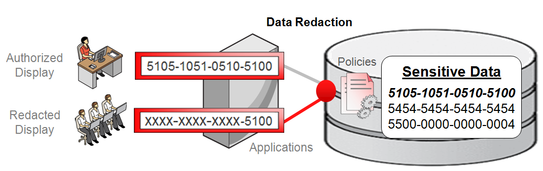
With the Data Redaction feature in Oracle 12c, you can now have selective, on-the-fly redaction of important/sensitive data before the SQL result displaying to the end user. Unlike TDE, the data redaction doesn’t change the actual data, it redacts data on-the-fly, i.e, before the SQL query displays the sensitive data to the application user. You can redact data via different methods: full redaction, partial redaction, Random and regular expression.
To configure data redaction, the user must have EXECUTE privileges on the new DBMS_REDACT package.
syedpic2
Image copyright: Oracle


First line of defense – Oracle Database firewall

The Oracle database firewall option prevents database attacks from internal and external accesses by acting as the first line of database defense. It sits on the network layer, transporting data to the application and database layers without any application modification needed.
With its highly accurate SQL-based monitoring ability, all unauthorized and suspicious network traffic to the databases is blocked. When the SQL-based policies are configured and defined, the SQL statements will be analyzed before they’re sent to the database and appropriate action is taken. With the white, black and exception lists support, you can define a set of SQL statements that the firewall can see, this can include users, schemas and SQL statements that you need to prevent attacks from reaching the database.
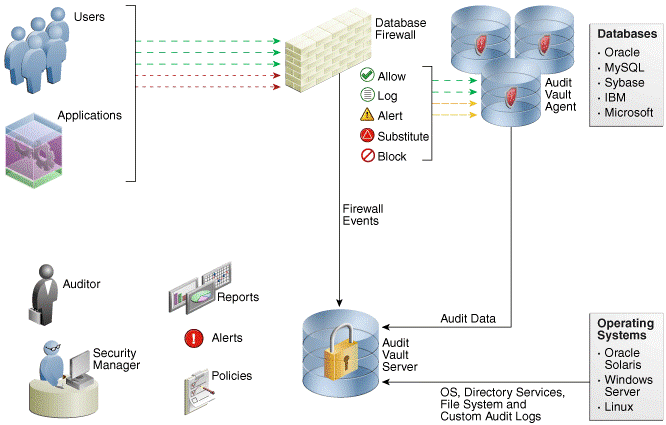
The following image depicts the overall Audit Vault and Database firewall architecture and its functionality:
whatsnewin12c
Image courtesy: Oracle documentation

Oracle Secure Backups (OSB)

Although several third-party vendor-supported Tape-Based backup solutions exist, Oracle Secure Backups (OSB) provides backup encryption, protection and centralized backup solutions. The OSB has built-in support to Recovery Manager (RMAN), protection to the file system on UNIX, WINDOWS and Linux hosts, centralized backup management and its cloud module supports backup on the cloud.  The following are the key benefits of OSB:
  • Centralized tape backup management
  • Backups over the cloud
  • Supports Exadata backups
  • Encrypts backups and secure backup data
  • Provides enterprise data protection

Network encryption and storage authentication

In my previous article, I explained how to mask sensitive data, data redaction, controlling super sys privileges, data encryption etc. This segment will cover how to apply security controls in network and storage layers.
As part of storage authentication, Oracle provides the following industry standard authentication methods:
  • Kerberos: enables single sign-on and centralized authentication capabilities to the Oracle users.
  • RAIDUS: provides remote authentication and access with a client/server protocol in a client/server network environment using the smart cards and token cards mechanism.
  • Secure Socket Layer (SSL): an industry standard protocol which supports authentication, data integrity and data encryption. Oracle uses the SSL protocol for secure client/server communication, SSL can also be configured to provide server only, client only or both authentication.
To prevent unauthorized users from viewing the plain text data that’s been sent over the network, you will have to apply encryption to network data. This protects against Data modification and Replay attach attacks.
Oracle Net Manager offers network encryption configuration options on the client and server. You can choose one of the four (REJECTED, ACCEPTED, REQUESTED and REQUIRED) listed options from the Checksum Level list. Also, the sqlnet.ora file must contain following entries:

Oracle database 12c new security features

It’s time to review a few selective Oracle database 12c enhancements and additions. Here is the list of new features:
  • With Oracle 12c, a new schema, AUDSYS, is solely used to store the unified audit trail records in the table.  Typically, audit records are first kept in the SGA queue and are then periodically written to the AUDSYS schema audit table in the SYSAUX tablespace. This prevents writing the records immediately to the table and improves overall audit trail process. However, you have the ability to overwrite or define the rules on how the audit records should be written, immediately or queued in the SGA.
  • RESOURCE role no longer grants UNLIMITED TABLESPACE privilege
  • SELECT ANY DICTIONARY no longer provides access to the SYS and DICTIONARY tables
  • Unified Audit trail for all individual components: SYS.ADU$, fine-grained auditing, Oracle Database vault, Oracle Label Security etc
  • Separate duties of Audit administration
  • Enhanced password verification functionality

Common database security practices

It is not a good idea to   comprise on data security, at the very least businesses should apply the basic level of database security compliance. According to Verizon’s security survey, 97% security breaches are preventable with a very basic level of security controls. The following are a few security guidelines, in no particular order, which are common basic security practices you should consider adopting in your production environments:
  • Apply regular PSU patches
  • Enable basic level and common database auditing parameters:  AUDIT_TRAIL, AUDIT_SYS_OPERATIONS, AUDIT_FILE_DEST
  • Limit or grant only required privileges to the database users
  • Contain super users and revoke all unnecessary privileges from the PUBLIC role
  • Lock down and change the default passwords to the pre-defined, non-administrative database users
  • Avoid using the default 1521 port
  • Enforce password management profiles, such as password reuse max, life time, password life time etc
  • Secure batch jobs
  • Encrypt sensitive data
  • Control data access
  • Maintain SYS.AUD$ table
  • Audit and track all important database changes

ORA-01031: insufficient privileges DB Vault

SQL> alter system set max_dump_file_size=10000 scope=spfile;
alter system set max_dump_file_size=10000 scope=spfile
*
ERROR at line 1:
ORA-01031: insufficient privileges
In  Database Vault enabled databases, SYS user is not able to change certain  parameters using and ALTER SYSTEM command.
The commands are failing :
Database Vault prohibits the dynamic change of certain parameters. The dynamic change of the following parameters is blocked intentionally:
dump datafile
DB_CREATE_FILE_DEST
DB_CREATE_ONLINE_LOG_DEST_1
db_recovery_file_dest
LOG_ARCHIVE_DEST_%
log_archive_dest_state_%
background_dump_dest
core_dump_dest
user_dump_dest
audit_file_dest
db_recovery_file_dest
DB_RECOVERY_FILE_DEST_SIZE
standby_archive_dest
recyclebin=on
control_files
optimizer_secure_view_merging = true
utl_file_dir
plsql_debug=true
audit_sys_operations = false
audit_trail
remote_os_roles
os_roles
job_queue_processes
sql92_security
So there are two ways you can solve it
Workaround I:
Disable the  ALTER SYSTEM command rule.
Login to the Database Vault Console -> select command rule -> select ALTER SYSTEM command -> Edit and set it disable.
select * from dvsys.DBA_DV_COMMAND_RULE;
COMMAND                        RULE_SET_NAME                                                                              OBJECT_OWNER    OBJECT_NAME                         E PRIVILEGE_SCOPE
—————————— —————————————————————————————— ————— ———————————– – —————
CREATE USER                    Can Maintain Accounts/Profiles                                                             %               %                                   Y
DROP USER                      Can Maintain Accounts/Profiles                                                             %               %                                   Y
CREATE PROFILE                 Can Maintain Accounts/Profiles                                                             %               %                                   Y
ALTER PROFILE                  Can Maintain Accounts/Profiles                                                             %               %                                   Y
DROP PROFILE                   Can Maintain Accounts/Profiles                                                             %               %                                   Y
ALTER USER                     Can Maintain Own Account                                                                   %               %                                   Y
CHANGE PASSWORD                Can Maintain Own Account                                                                   %               %                                   Y
ALTER SYSTEM                   Allow Fine Grained Control of System Parameters                                            %               %                                   Y
begin  DVSYS.DBMS_MACADM.UPDATE_COMMAND_RULE
(command=> ‘ALTER SYSTEM’,
rule_set_name   => ‘Allow Fine Grained Control of System Parameters’,
object_owner    => ‘%’,
object_name     => ‘%’,
enabled         => ‘N’);
end;
/
Change the parameter
alter system set max_dump_file_size=10000 scope=spfile;
begin  DVSYS.DBMS_MACADM.UPDATE_COMMAND_RULE
(command=> ‘ALTER SYSTEM’,
rule_set_name   => ‘Allow Fine Grained Control of System Parameters’,
object_owner    => ‘%’,
object_name     => ‘%’,
enabled         => ‘Y’);
end;
/
select * from dvsys.DBA_DV_COMMAND_RULE;
Workaround II:
Manually edit init.ora and change the parameters. And restart the database with this init.ora file with the command STARTUP PFILE=<path/name of the pfile>